
gaeb-online: Convert Excel to GAEB – GAEB-Online 2025
Simple conversion from Excel to GAEB
The import assistant walks you through the conversion in three simple steps.
Reads Excel files directly – no intermediate export, no data loss.
A ready-made Excel sample file ships with the installation – use it straight away as a template.
With GAEB-Online 2025 you can convert Excel spreadsheets, OpenOffice files and CSV data into valid GAEB files quickly and reliably. The integrated import assistant guides you step by step through the whole process.
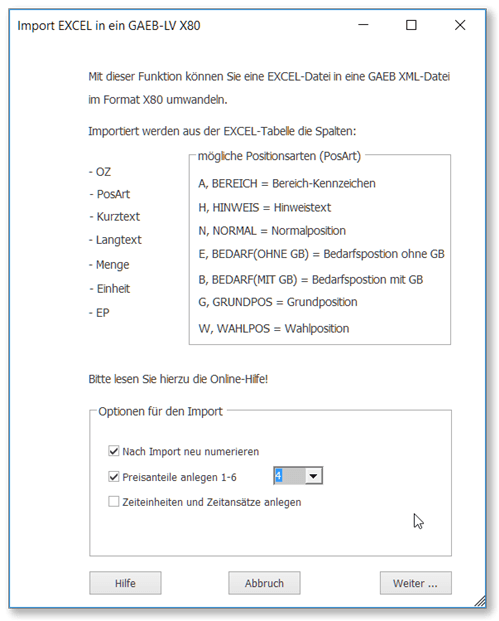
During conversion, an import assistant supports you in GAEB-Online 2025. It lets you read in the Excel® data with various options in three steps. GAEB-Online 2025 takes care of the conversion to GAEB format on its own.
Data from Excel®
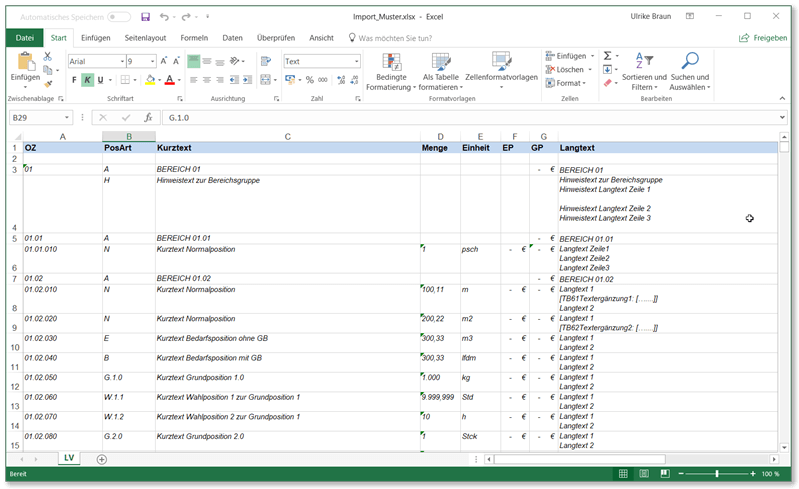
The Excel or OpenOffice file needs a fixed column layout. An Excel sample file is installed on your computer along with the software. You can use this sample file as a template for your data. Alternatively you can use the free Excel BoQ generator.
The Excel file is expected to contain the following columns:
- Item number (OZ)
- Item type (PosArt)
- Short text
- Quantity
- Unit
- Unit price (EP)
- Total price (GP)
- Long text
Item types
During conversion from Excel®, GAEB-Online 2025 supports the following structures and item types:
- Area groups
- Hint texts
- Normal items
- Demand items without total price
- Demand items with total price
- Base items
- Alternative / optional items
Conversion options
When converting from Excel to GAEB, GAEB-Online 2025 provides several options, for example renumbering the GAEB BoQ after import, defining unit-price components for the BoQ items, or setting time units and time allocations.
Supported data formats
Conversion from Excel to GAEB is possible from the following file formats:
- Excel® 2007 and later (*.xlsx)
- Excel® 93 through 2003 (*.xls)
- OpenOffice® (*.ods)
- LibreOffice (*.ods)
- CSV files (*.csv)
Sample file
So that you don't have to experiment for long, installing GAEB-Online 2025 places an Excel sample file on your computer. You can use it to try out the functions immediately and as a template for your own data. The file is available for Excel® as *.xlsx and for OpenOffice as *.ods.
Price
€ 120,–
plus VAT · one-time purchase · no subscription
You can order GAEB-Online 2025 as a single-user licence for just € 120 plus VAT over a secure page directly here. The single-user licence is bound to one computer by an activation key and can be transferred by the user to another computer.
Our prices are one-time purchase prices without ongoing fees. The AI Price Navigator is the exception – it is offered as a subscription. All updates within the current 2025 software generation are included at no extra charge.
This offer is aimed exclusively at entrepreneurs, dealers and tradespeople who are acting in the course of their commercial or self-employed activity when purchasing. All prices shown are net prices, plus the legally applicable VAT.
Frequently asked questions (FAQ)
Which file formats can I convert to GAEB?
GAEB-Online 2025 supports conversion from Excel® 2007 and later (*.xlsx), Excel® 93 through 2003 (*.xls), OpenOffice® (*.ods), LibreOffice (*.ods) and CSV files (*.csv).
How does the Excel-to-GAEB conversion work?
A guided import assistant walks you through the conversion in three steps. GAEB-Online 2025 handles the actual conversion to GAEB format automatically. You only need to prepare the Excel file with the required column layout (item number, item type, short text, quantity, unit, unit price, total price, long text).
Which column layout does the Excel file need?
The Excel file requires the following columns: item number, item type, short text, quantity, unit, unit price, total price and optionally long text. An Excel sample file is placed on your computer when you install GAEB-Online 2025, which you can use as a template.
Which item types are supported during conversion?
GAEB-Online 2025 supports: area groups, hint texts, normal items, demand items without total price, demand items with total price, base items and alternative / optional items.
Is there a sample file for Excel-to-GAEB conversion?
Yes. Installing GAEB-Online 2025 automatically places an Excel sample file on your computer. It is available as *.xlsx (Excel) and *.ods (OpenOffice / LibreOffice). Alternatively you can use the free Excel BoQ generator.
What options does the conversion assistant offer?
During import you can renumber the GAEB BoQ, define unit-price components for the items and set time units and time allocations. These options allow flexible adjustment of the imported bill of quantities.
What does GAEB-Online 2025 cost – is there a subscription?
GAEB-Online 2025 costs € 120 plus VAT as a single-user licence. It is a one-time purchase without subscription – all updates within the 2025 software generation are included at no extra charge.
Can I try GAEB-Online 2025 free of charge before buying?
Yes. You can download and test GAEB-Online 2025 free of charge – including Excel-to-GAEB conversion. For any questions feel free to email us at info@gaeb-online.de.
Who is this offer for?
This offer is aimed exclusively at entrepreneurs, dealers and tradespeople who are acting in the course of their commercial or self-employed activity when purchasing. All prices are net prices plus the legally applicable VAT.